Fanny
Fanny User Guide
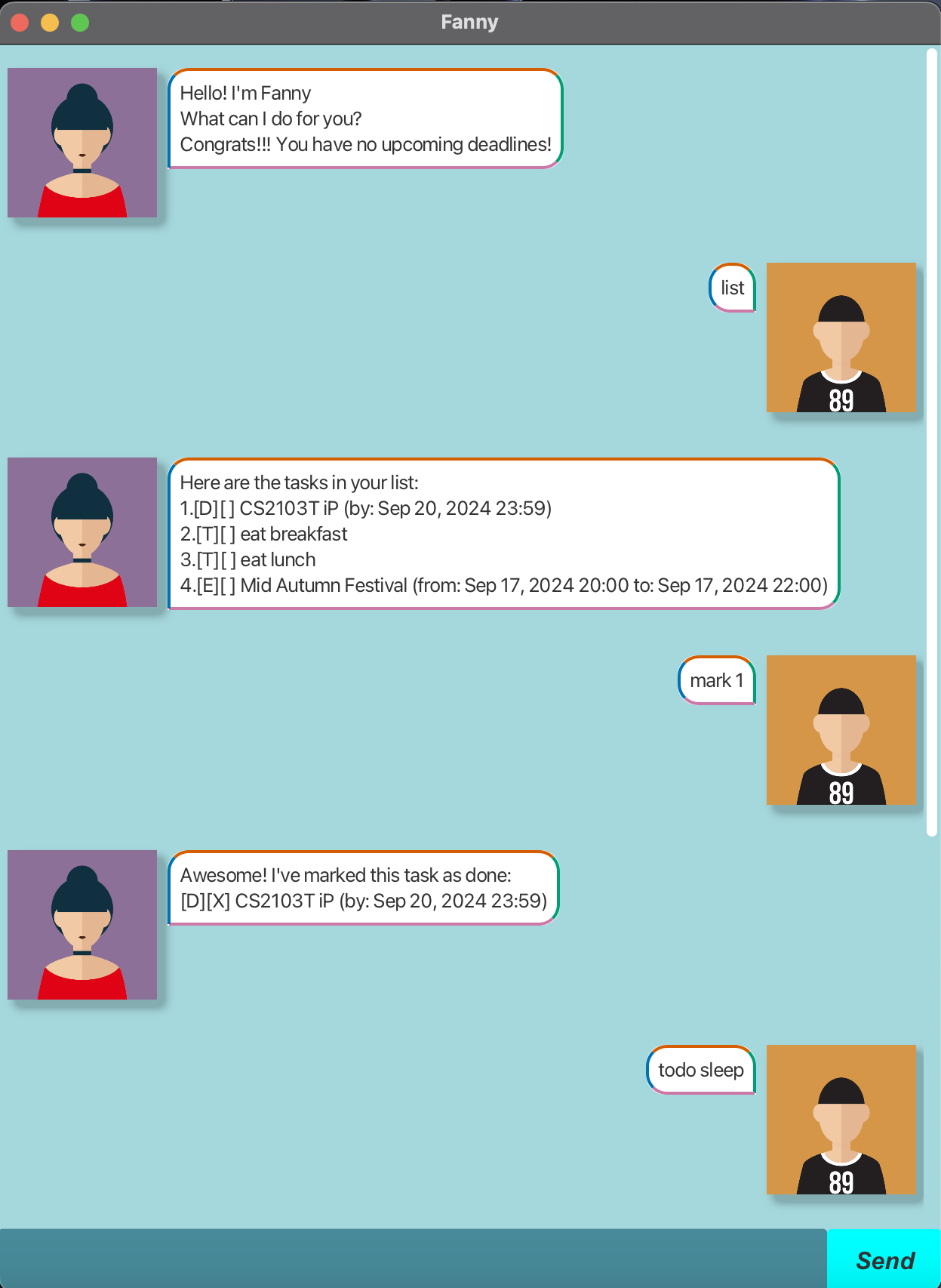
Fanny is a personalised task management chatbot. Managing tasks is made simple with Fanny!
Quick start
1) Ensure you have Java 17 or above installed in your Computer.
2) Download the latest .jar file from here.
3) Copy the file to the folder you want to use as the home folder for the chatbot.
4) Open a command terminal, cd into the folder you put the jar file in, and use the java -jar fanny.jar command to run the application. A GUI similar to the above should appear in a few seconds.
5) Type the command in the text box and press Enter to execute it. e.g. typing list and pressing Enter will prompt Fanny to list all tasks.
6) Refer to the Features below for details of each command.
Features:
Note:

- Words in UPPER_CASE are the parameters to be supplied by the user.
e.g. in todo DESCRIPTION, DESCRIPTION is a parameter which can be used as todo eat.

- Extraneous parameters for commands that do not take in parameters (such as list, remind and bye) will be ignored.
e.g. if the command specifies bye 123, it will be interpreted as bye.
Adding todo tasks
Create a non time-bound task using the todo command.
Input: todo DESCRIPTION
Example: todo Sleep
Expected outcome:
Roger that. I've added this task:
[T][ ] Sleep
Now you have 1 task in the list.
Adding deadlines
Create a task with deadline using the deadline command.
Input: deadline DESCRIPTION /by YYYY-MM-DD HH:MM
Example: deadline Homework /by 2024-09-18 23:59
Expected outcome:
Roger that. I've added this task:
[D][ ] Homework (by: Sep 18, 2024 23:59)
Now you have 2 tasks in the list.
Adding events
Create a event task with a specified time frame using the event command.
Input: event DESCRIPTION /from YYYY-MM-DD HH:MM /to YYYY-MM-DD HH:MM
Example: event Celebration /from 2024-09-20 20:00 /to 2024-09-20 23:00
Expected outcome:
Roger that. I've added this task:
[E][ ] Celebration (from: Sep 20, 2024 20:00 to: Sep 20, 2024 23:00)
Now you have 3 tasks in the list.
Viewing all tasks
View all tasks using the list command.
Input: list
Expected outcome:
Here are the tasks in your list:
1.[T][ ] Sleep
2.[D][ ] Homework (by: Sep 18, 2024 23:59)
3.[E][ ] Celebration (from: Sep 20, 2024 20:00 to: Sep 20, 2024 23:00)
Marking a task as completed
Mark a task as completed using the mark command.
Input: mark INDEX
- Mark the task at
INDEXas done. - The index refers to the index number shown in the displayed task list.
- The index must be a positive integer 1, 2, 3, …
Example: mark 1
Expected outcome:
Awesome! I've marked this task as done:
[T][X] Sleep
Marking a task as NOT completed
Mark a task as not completed using the unmark command.
Input: unmark INDEX
- Mark the task at
INDEXas NOT done. - The index refers to the index number shown in the displayed task list.
- The index must be a positive integer 1, 2, 3, …
Example: unmark 1
Expected outcome:
Sadly, I've marked this task as not done yet:
[T][ ] Sleep
Deleting a task
Delete a task using the delete command.
Input: delete INDEX
- Delete the task at
INDEX. - The index refers to the index number shown in the displayed task list.
- The index must be a positive integer 1, 2, 3, …
Example: delete 1
Expected outcome:
Noted. I've removed this task:
[T][ ] Sleep
Now you have 2 tasks in the list.
Finding a task
Find a task with a keyword using the find command.
Input: find KEYWORD
- The search is case-sensitive. e.g eat will not match EAT
- Partial words will be matched e.g. eat will match eating
- The order of the keywords matters. e.g. sleep eat will not match eat sleep
Example: find Homework
Expected outcome:
Here are the matching tasks in your list:
1.[D][ ] Homework (by: Sep 18, 2024 23:59)
If there are no matching tasks:
No matching tasks found.
Reminding the user
Upon launching the app, Fanny will remind users of upcoming deadlines (due within the next 24 hours).
Users can also use the remind command to get reminders.
Input: remind
Expected outcome:
Please complete these tasks soon:
[D][ ] Homework 1 (by: Sep 18, 2024 16:00)
If there are no deadlines due in the next 24 hours:
Congrats!!! You have no upcoming deadlines!
Exiting the program
Exit the chatbot using the bye command.
Input: bye
Expected outcome:
Bye. Hope to see you again soon!
Saving the data
Fanny data are saved in the hard disk automatically after any command that changes the data. There is no need to save manually.
Editing the data file
Fanny data are saved automatically as a txt file [JAR file location]/data/fanny.txt. Advanced users are welcome to update data directly by editing that data file.
Caution:
Certain edits can cause Fanny to behave in unexpected ways!
Therefore, edit the data file only if you are confident that you can update it correctly.
Sources:
Credits to Freepik for the avatar design.
Fanny: Avatar icon. Freepik. (n.d.-a). https://www.freepik.com/icon/avatar_168734
User: Avatar icon. Freepik. (n.d.-a). https://www.freepik.com/icon/avatar_168720
Command Summary
| Action | Format, Example |
|---|---|
| List | list |
| Todo | todo DESCRIPTION e.g., todo sleep |
| Deadline | deadline DESCRIPTION /by DATE e.g., deadline Homework /by 2024-09-18 23:59 |
| Event | event DESCRIPTION /from START_DATE /to END_DATE e.g., event Celebration /from 2024-09-20 20:00 /to 2024-09-20 23:00 |
| Mark | mark INDEX e.g., mark 1 |
| Unmark | unmark INDEX e.g., unmark 1 |
| Delete | delete INDEX e.g., delete 1 |
| Find | find KEYWORD e.g., find eat |
| Remind | remind |
| Bye | bye |